Countdown timers and personalized images come together on every plan, so there is no second
subscription to justify at budget time. Start free with 5,000 opens a month. Starter is $19 for
250,000, or ₹1,599 if you are billing in India, and annual billing gives you two months back
either way.
Dollars run on Stripe. Rupees run on Razorpay, with UPI Autopay, net banking eMandate, or a card.
Free
$0
a month
₹0
a month
Free, with no card
Free, with no card
5,000 opens a month
For a first campaign, a small list, or proving the idea works before you ask for budget.
5,000 monthly image opens
3 live images at a time
Bundled fonts
Digital and underline timer styles
See what each email client will show before you send
Prices exclude tax. Tax is shown at checkout. If a plan does not do what this page says it does, tell us within 30 days of the charge and we refund
it. That is section 6 of the terms,
not a campaign.
How you pay
Two gateways, because a card mandate is not how most people in India pay for a subscription.
You choose the currency before you pay.
Dollars, through Stripe
Visa, Mastercard and American Express, plus Apple Pay and Google Pay where your browser
offers them. Available wherever Stripe operates.
Rupees, through Razorpay
UPI Autopay, so the mandate sits in the UPI app you already use. Net banking eMandate for
finance teams that pay from a bank account. Indian credit and debit cards.
Tax is shown at checkout. Annual Agency plans can also pay by bank transfer against an invoice
if your finance team needs that.
Go over your plan, and your subscribers never see a broken image.
Go over your plan in the middle of a send and nothing stops. Your images keep rendering. We email you at 80 percent of your monthly opens and again at 100 percent. Past 110 percent, new renders carry a small watermark until you move up a plan. A campaign in flight is never held hostage.
On the free plan too
The free plan is a real product, not a screenshot
Three live templates, 5,000 opens a month, two timer styles, and the email client preview that
tells you what will land. Enough to run a genuine campaign and see whether the numbers move
before you spend anything.
Paid plans add your own fonts, every timer style, unlimited templates, and the layers that appear
only for the right subscriber.
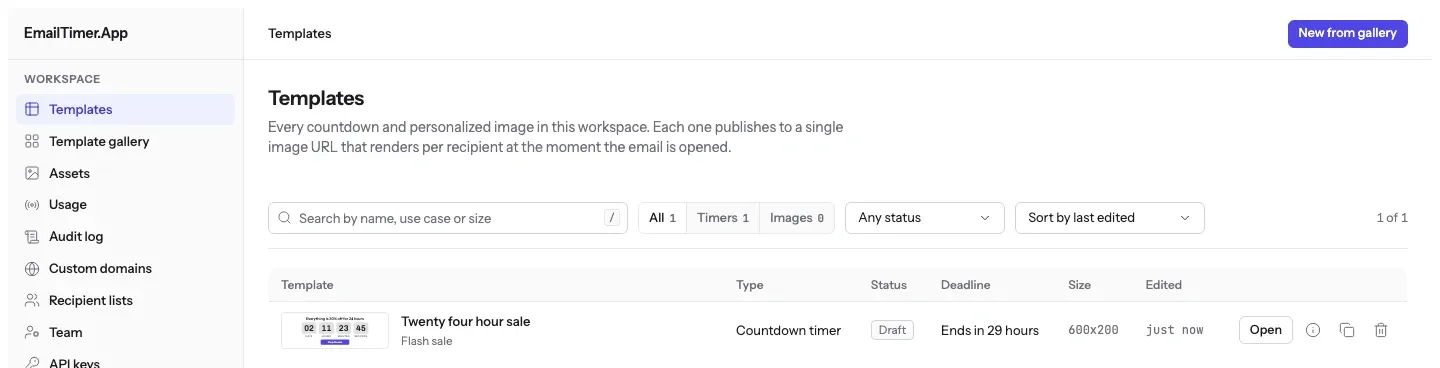
The templates screen on the free plan. Three of these rows can be live at a time, and every
one of them publishes to a single image address.
Digital and underline are on the free plan. Every style below is on Starter and up.
Digital
Plain numerals and nothing around them, the safe pick for a flash sale. Shown in magenta on blush pink.
Underline
One rule under each number, for editorial and premium sends. Shown as an early access window in navy on sky blue.
Flip
The split card people already read as a deadline. Shown as a Black Friday banner, deep red on cream.
Ring
A closing arc around each number, made for the run up to a launch. Shown in violet on lavender.
Blocks
Every unit on its own plate, so it holds up next to a busy product photo. Shown as a Christmas delivery cut-off in emerald and mint.
Bar
Numbers over a draining bar, so the urgency lands before the reading does. Shown holding a cart, in sunset orange on sand.
Comparing vendors
What other email countdown timer tools charge
Taken from each vendor's own published pricing page, on the dates under the table. If you are building a
comparison for a client or a CMO, take this table and check it yourself. We would rather you did.
Three of these vendors are cheaper per thousand views than we are at their entry tier, and the table
says so rather than hiding it.
Vendor
Starting plan
Opens included
Per 1,000 opens
What you get
Detail
EmailTimer.App
$19/mo
250,000 opens
$0.076 / 1k opens
Countdown timers and personalized images on one subscription.
You are here
NiftyImages
From its own pricing page
$59/mo
25,000 opens
$2.36 / 1k opens
Starter, Growth and Scale priced against a slider of opens a month, up to 500,000. Above that, and on the Enterprise tier that carries the developer API, pricing is a custom annual quote with no published number.
Timers. The free column strikes through Branding Removed, Evergreen Timer, background picture and Credits Rollover, and the site gates evergreen, backgrounds and motion timers by tier in its own upgrade prompts.
Free unlimited views; Starter 100,000 to Enterprise 10M
$0.07 down to $0.02 / 1k over the allowance
A countdown tool with a free plan its pricing page calls unlimited, branding shown on it, 60 sec animation and 2 yr analytics on every tier, and API access on free at 60 requests a minute. Merge-tag image personalization is not listed.
Prices checked on 16 September 2026. MailTimers and CountdownMail read on 17 September 2026. NiftyImages read on 23 September 2026. Each vendor sets its
own prices and can change them the day after we look.
Every plan, line by line
The bits that usually matter when you are deciding: how many opens, whose fonts, and whether you
can hand a client their own workspace.
Feature
Free
Starter
$19 a month
₹1,599 a month
Growth
$49 a month
₹3,999 a month
Agency
$149 a month
₹11,999 a month
Monthly image opens
5,000
250,000
1,000,000
5,000,000
Live templates at a time
3
Unlimited
Unlimited
Unlimited
Timer styles
Digital and underline
Every style
Every style
Every style
Personalized text from merge tags
Standard
Unlimited
Unlimited
Unlimited
Your own brand fonts
No
Yes
Yes
Yes
Personalized QR codes and progress bars
No
Yes
Yes
Yes
Show or hide layers per subscriber
No
Yes
Yes
Yes
REST API
No
No
Yes
Yes
CSV recipient uploads
No
No
Yes
Yes
Webhooks
No
No
Yes
Yes
White-label image domain
No
No
No
Yes
Separate workspace per client
No
No
No
Yes
Email client preview before you send
Yes
Yes
Yes
Yes
Support
Documentation and email
Email support, one business day
Email support, one business day
Email support, one business day
Questions
Billing, in full
How do you count monthly opens?
One open is one request for your image. A subscriber opens the email, their mail app fetches the countdown or the personalized graphic, and that is one. If Apple Mail or Gmail then serves the same image again from its own cache, that is their server doing the work and you are not charged for it a second time.
What happens if a campaign goes over my monthly limit?
Nothing stops. Your images keep rendering for the whole send. We email you at 80 percent of your monthly opens and again at 100 percent, and past 110 percent new renders carry a small watermark until you move up a plan. A send already in flight is never held hostage over a billing threshold.
Do timers from the free generator count toward a plan?
No. A timer from the free generator works for 500 opens without an account, and for 1,000 once you sign in and claim it. After that, the image shows a note that its free opens are used up. A timer you build in an account, on any plan, counts toward that plan's monthly opens instead.
How does annual billing work?
You pay for ten months and get twelve, in either currency. Starter is $190 for the year instead of $228, or ₹15,990 instead of ₹19,188. You can switch to annual at any point and the change is prorated against what you have already paid.
Which currency am I charged in, and can I switch?
You choose before you pay. The switch above the plans changes what this page shows, and it opens on rupees if your browser looks like it is set to India and dollars otherwise. Dollar subscriptions run through Stripe and rupee subscriptions run through Razorpay. Once a subscription is live it stays in the currency it started in, because neither gateway can change the currency of a running subscription. Switching means cancelling at the end of the cycle you have already paid for and starting a new one in the other currency, which you can do yourself from account settings. Tell us the date and we will line the two up so you are never paying twice.
What happens to my subscription if I move countries?
It carries on. Billing follows the currency you signed up in rather than where you are sitting, so a dollar subscription keeps charging the same card after you land in Bengaluru, and a rupee subscription keeps charging the same UPI mandate after you move to London. Your templates, your published image URLs, and every campaign already sitting in an inbox are untouched. If you would rather pay in the local currency after the move, that is the switch above: cancel at the end of the paid cycle and start again in the other currency.
How do client workspaces work on Agency?
An owner of the account can create a separate workspace for each client, up to 200 in one account. They all share the plan's 5,000,000 monthly opens and its 5 white-label domains, as one allowance for the account rather than one each. If you move from Agency to a lower plan, your client workspaces stay and every image already sent from them keeps rendering, but you cannot create new ones until you are back on Agency.
Can I change or cancel my plan?
Yes, from your account settings, without emailing anybody. Upgrades take effect immediately and are prorated. Downgrades and cancellations take effect at the end of the billing cycle you have already paid for. Razorpay has no hosted customer portal, so rupee customers do all of this on our own screens rather than being sent to a gateway page.
Is there an extra charge for using our brand fonts?
No. Uploading your own .woff2 or .ttf files is included on every paid plan from $19 a month. Some vendors in this category put custom fonts behind a higher tier, which is worth checking when you compare.
What can we pay with?
Paying in dollars goes through Stripe: Visa, Mastercard and American Express, plus Apple Pay and Google Pay where your browser offers them. Paying in rupees goes through Razorpay: UPI Autopay, so the recurring mandate sits in the UPI app you already use, net banking eMandate, and Indian credit and debit cards. Annual Agency plans can also pay by bank transfer against an invoice. Tax is shown at checkout.
Start on the free plan and see if it moves anything
5,000 opens a month, no card, and you can put a timer in the campaign you are already writing.
An open is counted when a mail app fetches the image. Which fetches count and which do not, and
when a period starts, is written out in
how opens are counted, and
how the render pipeline works
follows that request from the snippet to the picture. Why Apple Mail and Gmail sometimes show a copy
they already hold, which is why a cached view is not counted again, is written up on
the blog.
Google Analytics counts page views on this site. It sets two cookies, and neither is
set unless you accept. The privacy policy says what
they are.